Using an Avatar
An avatar is a graphical representation or picture of yourself that you can use on a website. Astute Agent enables you to display an avatar on the Sign In window and page banner using Gravatar. By uploading your avatar file and saving it on the Gravatar website, you can maintain your avatar in one place. Then, when you log into any Gravatar-enabled site using the same email address on your account, your avatar will automatically display.
To set up your avatar:
- Access the Gravatar website at http://www.gravatar.com.
- Follow the steps on the Gravatar website to upload your photo or avatar image file.
- Sign into Astute Agent. The avatar you uploaded to Gravatar will display on the banner.
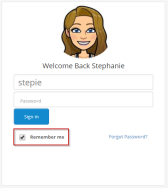
- If you select the Remember me check box on the Sign In window, your avatar will display on the Sign In window the next time you access Astute Agent.
Note: When you create your Gravatar account, you must use the email address associated with your Astute Agent User ID.

Note: If you choose to remove your avatar from Gravatar, the Astute Agent default image  will display when you sign into Astute Agent.
 Related Topics
Accelerate your Agent knowledge by visiting Emplifi Learning, our online learning platform, for on-demand courses, certifications, how-to videos and even more guides!
Copyright © 2023 Emplifi Inc. All rights reserved.